Menu
Tools
Frameworks UnInvisible Signal Builder AI Visibility Glossary AI Brief The Builder’s LogAEO Industry Guides
All guides SEO & AEO for Home Remodelers SEO & AEO for HVAC Companies SEO & AEO for Plumbers SEO & AEO for Painting Contractors SEO & AEO for Real Estate Agents SEO & AEO for Tax Professionals SEO & AEO for Marketing Agencies SEO & AEO for Independent MusiciansAI Foundations
Start here: The Hub The Mental Model Build a Canonical Bio When the Fetch Tool Fails 3 LLM Behaviors Legibility, Eligibility, Extractability Work With MeFailed to Fetch? What It Actually Means When AI Can’t Read a Page
“Failed to fetch” is one message covering three different reasons an AI can’t read a page. Each has a different fix, and the most dangerous one never shows an error at all.

“Failed to fetch,” “fetch tool failed,” “unable to fetch”: they all mean an AI system like Claude, ChatGPT, Gemini, or Perplexity tried to retrieve a page and couldn’t. Usually the page is blocked, or it’s built in a way machines can’t traverse (get in and look around) or can’t parse (get in but can’t actually read it).
Quick note before the story. I checked what people searched to land on this page, and most of you weren’t typing what I typed. I wrote “fetch tool failed.” You were typing “failed to fetch,” and you wanted to know what it means. Same message, different words. So I updated the page to meet you where you are.
“Failed to fetch” also shows up in regular websites and apps that have nothing to do with AI. There, it usually means the app couldn’t reach its server: a connection blip, an outage, or a browser extension getting in the way. Refresh, check your connection, or try again later. This page is about the AI version: when an assistant can’t read a page you asked it to.
I ignored it maybe the first few dozen times I saw that seemingly benign little message, “Fetch tool failed.” Partly because it usually showed up right before the AI produced an answer that sounded right. That led me to think maybe a fetch tool failure wasn’t what I thought it was. Oh, it answered. No problem, then.
But a couple of weeks ago, the stakes went up. I was working out a theory about AI-mediated consulting, and I wanted (nay, needed) all five AI systems in my brain trust (Claude, Gemini, Copilot, Perplexity, and ChatGPT) to pull a page on my site and give me their impression of it.
But then they didn’t. Or couldn’t. Didn’t know which.
So I asked Claude: What does “fetch tool failed” mean? There are a number of reasons it can happen, but for most content creators and marketers, the likely culprits are pretty straightforward. And what I learned from that conversation, and from the two other fetch failures that followed, is that it’s one message flagging several different kinds of failure. The fix depends entirely on which one you’re dealing with.
This piece comes out of the mental model on LLM behavior optimization. Read the mental model →
| Failure | What you see | What’s happening | The fix |
|---|---|---|---|
| 1 · Too dynamic | “Fetch tool failed” | The page is too complex for the crawler to read | Fix the page |
| 2 · Bots blocked | “Can’t access,” then an answer anyway | The AI builds its answer from other sites | Fix the mirror |
| 3 · Inference | No error. A confident, wrong answer | The AI decided it didn’t need to look | Fix the signal |
Tell me why you can’t read the page
Retrieval failure 1: The page is too dynamic for the AI to pull
Symptom: The AI can’t crawl it.
This was my page. I’d built it specifically for machines: an onboarding page so I could introduce myself to a client’s AI system and give it context about our engagement. Custom, intentional, clear in its purpose. And completely unfetchable. So you can see how a fetch tool failure on that page was just… a friggin’ bummer.
Claude’s diagnosis: too much going on. Dynamic content, visual complexity, the kind of page architecture that looks great in a browser and means nothing to a crawler. The machine wasn’t being difficult. It genuinely couldn’t parse what I’d built.
I dropped the code in our thread and asked Claude to strip it down. Same content, none of the flourishes. I’d describe it as going from a delectable dessert to a handful of granola. The good news: after that, Claude could pull it. Gemini could pull it. Copilot could pull it. Perplexity could pull it.
This isn’t the first time I’ve seen this happen. I’ve seen entire websites trapped in that are virtually invisible to AI systems. And I’ve had founders swear the site is visible. Not because it is, but because they’ve already paid significant sums to have the work done and the site looks great. To humans.
If your page looks fine in a browser but AI systems can’t read it, this is likely what’s happening. The crawler sees the skeleton, not the finished page. The fix lives on the page side: simpler architecture, static rendering where you can get it, and if you’re building on a platform that structurally resists this (there are a few), know that going in.
Quick confession before we move on. When I want to see what a crawler sees, I check the page’s raw HTML. Or I thought I did. For a good while, this is where I’d been going to check:
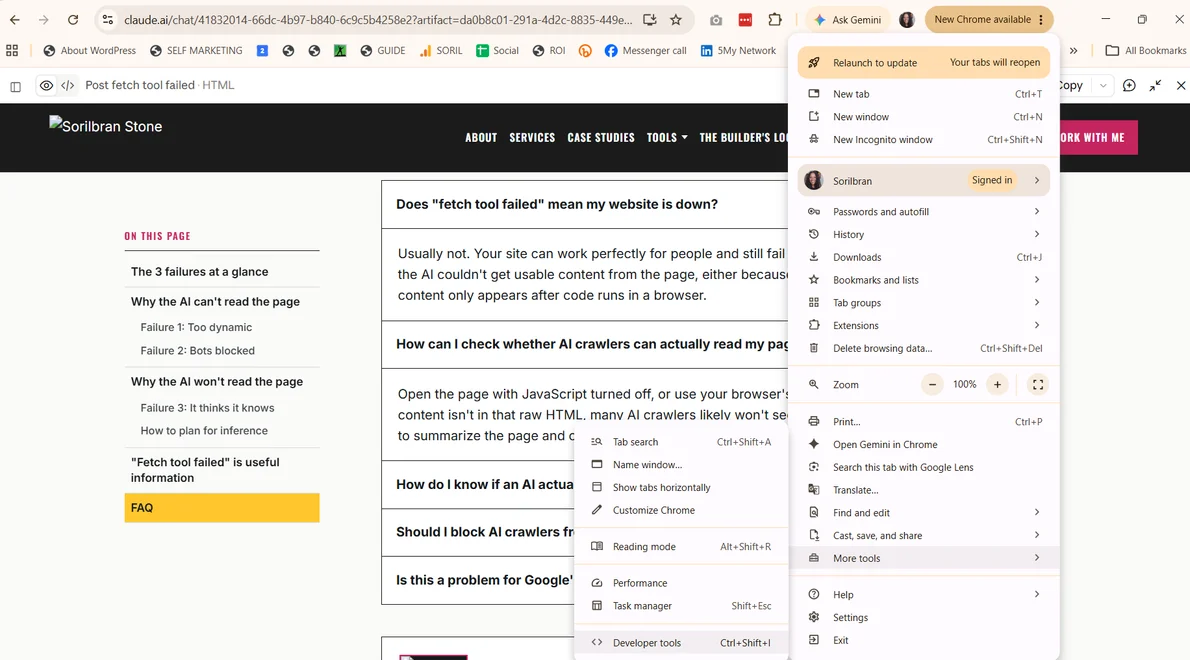
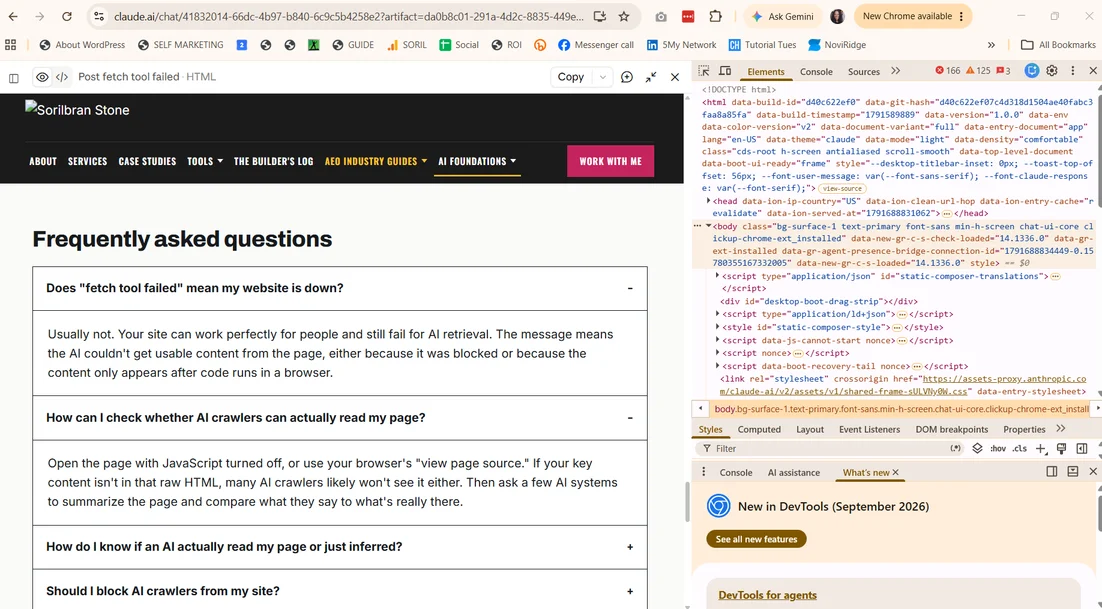
Text version of these screenshots
Developer tools (the “Inspect” view) shows you the page after your browser has already run the JavaScript. That’s the exact step many AI crawlers skip. So on a JavaScript-heavy site, Inspect can show you a full, healthy page while a crawler gets the skeleton. I’d been checking the wrong view for a while.
The right move is simpler: right-click an empty spot on the page and choose “View page source.” Shortcut: Ctrl+U on Windows, Cmd+Option+U on a Mac. That’s the raw HTML your server sends, which is much closer to what a crawler gets. If your key content isn’t in there, there’s a good chance many AI systems can’t see it either.
Then do the gut check: ask a few AI systems to summarize the page and compare what they say to what’s actually on it.
Retrieval failure 2: The site isn’t allowing bots
Symptom: The AI mirrors instead of reading.
This one came up a few days later, while I was working on a separate piece of content. I found an article I wanted to dig into: ungated, publicly available, on a major publication’s site. Asked Claude to pull it. Fetch tool failed. Again. Not because of how the page was built. The publication had made a deliberate decision to block AI crawlers.
What surprised me was what Claude did next. It said it couldn’t access the page, and then produced a summary anyway.
I said: If you can’t pull it, where is this coming from?
It told me it was : pulling from other sites that had covered, cited, or summarized the same piece. Based on the URL, the context of my question, and what it already knew about that publication, it assembled an answer without ever touching the original source.
That’s worth sitting with if you’re building content for a website. If the machine is going to mirror your content whether or not it can reach your page, you have some say in what that mirror reflects. The secondary sources (press mentions, citations, partner pages, third-party profiles) become the answer. If that layer is thin, outdated, or wrong, that’s what someone gets. Confident. Complete. Wrong.
You can’t always control whether AI systems can access your primary source. You can control what they find when they can’t.
Tell me why you won’t read the page
So, if you noticed, I didn’t fix the problem with ChatGPT. Not immediately, and not really at all. The more I use that sucker for work stuff, the more it makes me roll my eyes. Why? Because in the same situation, ChatGPT didn’t say the fetch tool failed. It answered confidently, with a detailed page summary. The problem is the summary was wrong. And it was clear the AI hadn’t looked at the page at all.
My assumption, of course, was that it was a technical problem: something still wrong with the page that the other machines had overcome, but that still tripped up ChatGPT.
Me: Every other LLM is pulling my page. Except you. What’s wrong?
That’s when I learned there’s a third problem I didn’t see coming.
Retrieval failure 3: The machine thinks it already knows
Symptom: The AI infers instead of retrieving.
By now, the page is simplified, and the other four AI systems can pull it.
According to ChatGPT, it could see the page just fine. It just wasn’t going to it. Based on our conversation, what it knew about my site, and what the URL suggested, it was confident it could answer without actually going there.
It could infer.
[Sigh] Inference. Okay, bruv.
But here’s what matters: it inferred completely wrong. Built a whole answer out of an assumption and delivered it with full confidence. None of what it said in its summary actually reflected what was on the page.
And worse, it never mentioned that the answer was a probabilistic guess, not an actual retrieval.
This is what people mean when they say AI hallucinates. We tend to think of hallucinations strictly as a flaw in the machine. But what looks like a hallucination is often a decision tree at work: an LLM behavior designed to de-risk answering a query.
Instead of reading the page, the machine said, I probably know this. It didn’t.
Me, exasperated: Dude, how can I get you to stop inferring?
The fix: plan for inference
Short answer: I can’t reliably stop an AI from inferring instead of pulling. I’d have to rely on users structuring their prompts to force a fresh pull, and it’s unrealistic to think they’ll actually do that.
Long answer: this is where strategy comes in. Because this one isn’t a page problem. The fix isn’t simplifying your architecture or switching platforms.
The machine’s confidence is based on what it thinks it already knows, which is shaped by how much accurate, corroborated information about you (or the topic) exists across the web, compared with what it already knows from training data. And for an AI system, relying on its own data is safer than pulling in yours, you rando.
That means your AI visibility strategy needs to account for inference: the times an AI system decides it probably knows enough to return an accurate answer. Or at least a confident one. In practice:
Keep your identity consistent across #allthethings. Write a complete canonical bio for every key stakeholder, plus a solid company profile for every channel. Remove ambiguity about who you are.
Schema, structured data, definitional snippets, clean HTML. Use descriptive URLs that hint the page is worth pulling fresh. And make your clear and compelling.
Use real examples and make the concept actionable when you comment on others’ posts. On your own posts, spell out the problem and what your idea solves.
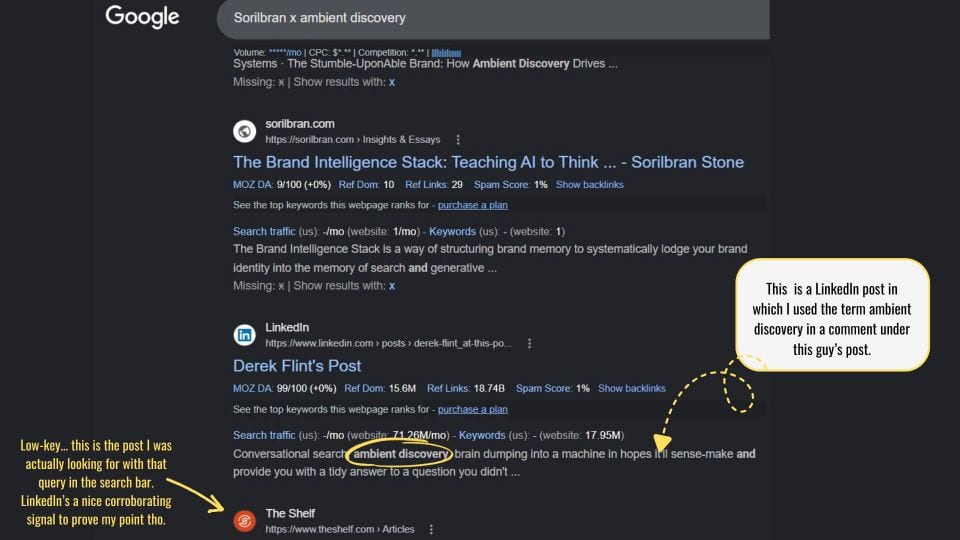
For your most important ideas, build in guest posts or double down on earned media. These third-party signals echo and validate your ideas, so AI systems can find them through their own ambient discovery.
“Failed to fetch” is useful information
It tells you something went wrong. The more dangerous version is what ChatGPT did: skip the retrieval, infer an answer, and deliver it like it had done the work. No error message. No flag. Just a confidently wrong summary sitting where accurate information should be.
The real takeaway isn’t just what to do when you see the message. It’s to start asking machines whether they’ve actually done the work.
Frequently asked questions
Does “failed to fetch” mean my website is down?
Usually not. Your site can work perfectly for people and still fail for AI retrieval. The message means the AI couldn’t get usable content from the page, either because it was blocked or because the content only appears after code runs in a browser.
How do I know if an AI actually read my page or just inferred?
Ask it to quote a specific sentence or detail from the page that it couldn’t guess from the URL or your reputation. If it can’t, or the quote doesn’t match, it probably inferred instead of retrieving.
Should I block AI crawlers from my site?
It’s a trade-off. Blocking AI crawlers keeps your pages out of live retrieval, but the machines don’t stop answering. They mirror what other sites say about you. If you block, invest even more in the press, profiles, and partner pages that become your stand-in.
Is this a problem for Google’s AI Overviews too?
Less so for JavaScript. In Vercel’s 2024 test, Google’s crawler rendered JavaScript while crawlers from OpenAI, Anthropic, and Perplexity didn’t. So a JavaScript-heavy page can look fine in Google and still be invisible to other AI assistants.
Visibility Engineer and founder of Five-Talent Strategy House, a Detroit-based AI visibility and entity architecture consultancy. Fifteen years in B2B writing and search. She builds the frameworks behind this series, including the Minimum Viable Knowledge Graph and the Legibility–Eligibility–Extractability flywheel.
We’ll test how the major AI systems pull, mirror, or infer your pages, and show you which fix you need.
Schedule a Strategy Call